

Check Your LESCO Bill Online — Fast, Free & Official
View, download, or print your LESCO electricity bill using your reference number or customer ID. No registration required.
Every month, thousands of consumers search for LESCO bill online because physical bills often arrive late or go missing. Missing a due date can mean unnecessary late payment surcharges. LESCO provides a free online system that allows consumers to instantly check, download, and print their electricity bill using official billing records. This guide explains the exact process, ensures accuracy, and helps you stay in control of your electricity expenses without relying on paper bills.
Key Takeaways
- Checking your LESCO bill online is completely free and available throughout the year
- The online bill shows exactly the same details as the physical copy
- You can view total amount, taxes, and due dates without delay
- The service works for all LESCO regions and consumer categories
- Bills can be downloaded as PDF files for record-keeping
- You can print the bill instantly when needed
- The online or duplicate bill is valid for both online and physical payments
LESCO Bill Online Tools
Check your LESCO electricity bill details and estimate charges with these quick online tools.
Check Your LESCO Electricity Bill Instantly
LESCO Bill Calculator
Enter your monthly units (kWh) to estimate your bill amount.
Tip: This is an estimated calculation. Your actual bill may vary due to taxes, fuel adjustments, and surcharges.
Quick Estimate
Unit to Bill Converter
Convert units into an approximate LESCO bill amount instantly.
Popular searches: “100 units bill”, “200 units bill”, “300 units bill”.
Bill Info
LESCO Bill Due Date Checker
Enter your LESCO reference number or Customer ID to locate the due date field on your bill.
Always refer to your latest LESCO bill copy for the exact due date.
Usage Estimate
Appliance Load Calculator
Estimate monthly units (kWh) from common appliances and get a bill range.
Helpful for estimating extra usage from AC, fans, and refrigerator load.
Bill Payment
Where to Pay LESCO Bill
Select a payment method to see common places where LESCO bills are paid in Pakistan.
Tip: After payment, keep the transaction ID / receipt screenshot for record.
LESCO Bill Online – Check & Download Duplicate Bill
LESCO bill online is an official digital facility that allows electricity consumers to view their monthly bill before or even without receiving the paper copy. The online bill shows full billing details such as payable amount, due date, meter readings, fuel price adjustments, and applicable taxes. This option is widely used by domestic, commercial, and industrial consumers to avoid delays and verify charges. The information is fetched directly from LESCO’s billing system, ensuring reliability and accuracy.
LESCO Online Tools (Official Links)
Quick access to bill check, complaints, e-billing, load-shedding schedule, and bill payment portals.
Reference No / Customer ID (for your own use)
Tip: Some portals require you to enter this again on the official page. We keep it private in your browser only.
Bill Check
Check LESCO Bill Online
Open the official bill checking page. Enter your Reference Number / Customer ID on the portal to view and print your duplicate bill.
Open Bill Check PortalWorks best on desktop browser. Keep your latest bill for exact digits.
Complaints
File Complaint (CCMS – PITC)
Register complaints related to power outage, billing, meter issues, and other service matters through the official complaint system.
Open Complaint PortalSave your complaint number for tracking and follow-ups.
Bill Payment
Pay Your Electricity Bill (ENC)
Use the Electronic Network for Collection (ENC) portal for utility bill payments where applicable. Confirm biller name and reference number carefully.
Open ENC Payment PortalAfter paying, keep receipt / transaction ID screenshot for record.
E-Billing
Subscribe for E-Billing
Subscribe to receive your electricity bill electronically. Useful to avoid late delivery and keep a monthly digital record.
Open E-Billing SubscriptionUse the same registered mobile/email you check regularly.
Load Shedding
Load Shedding / Shutdown Schedule
Check planned outages and shutdown schedules on the official page. This helps households and businesses plan backup power and reduce disruption.
Open Schedule PageSchedules may vary by feeder/area and can change during emergencies.
How to Check LESCO Bill Online by Reference Number
The most commonly used method to check a LESCO bill online is through the 14-digit reference number. This number is printed on every electricity bill and uniquely identifies your connection. Once entered, the system retrieves your latest bill instantly. Consumers prefer this method because it is fast, accurate, and does not require any registration. It works for both urban and rural connections and provides access to the complete bill within seconds.
What Is a LESCO Reference Number?
A LESCO reference number is a permanent identification number assigned to every electricity connection. It consists of batch codes, subdivision identifiers, and a unique consumer sequence, ending with “U” for urban areas or “R” for rural areas. This number remains the same throughout the life of the connection and appears on the top-left corner of the bill. It is required for bill checking, payments, complaints, and service-related requests.
LESCO Duplicate Bill – Download & Print PDF
A LESCO duplicate bill is an exact digital copy of your original electricity bill. It carries the same legal validity as the paper bill and can be used for all payment channels, including banks and mobile apps. Consumers often download duplicate bills when the original bill is lost, delayed, or damaged. The duplicate bill includes complete billing details and helps users verify charges before making payments.
How to Download LESCO Bill as PDF
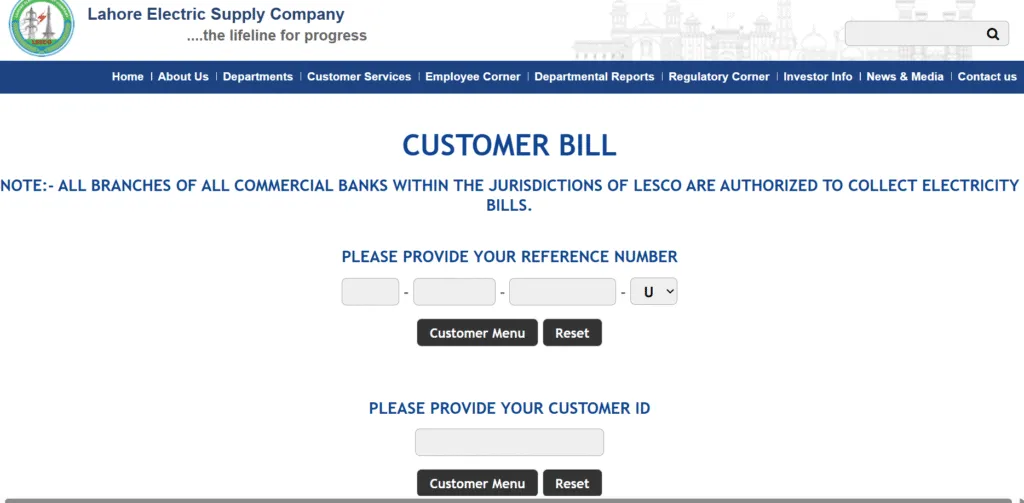
Downloading your LESCO bill in PDF format is straightforward and does not involve any fees. After entering your reference number and viewing the bill, you can use the print option and select “Save as PDF.” The downloaded file can be stored on your device for record-keeping, shared with employers, or used for payment verification. This feature is especially useful for users who rely on digital payments and documentation.
- · Open the LESCO bill online page on your browser
- · Enter your 14-digit Reference Number (or Customer ID, if available)
- · Click Check Bill and wait for your bill to load
- · Once the bill appears, click Print (or press Ctrl + P)
- · In the print window, find Destination and select Save as PDF
- · Click Save
- · Choose the folder/location on your device
- · Press Save again to download the PDF file
Check LESCO Bill by Customer ID
If you do not have your reference number, you can still check your LESCO bill online by Customer ID. A Customer ID is a 7-digit unique number assigned to each electricity connection and printed on the top-left side of the bill. This method is useful when the reference number is unavailable but an old bill or saved record exists. Once entered, the system retrieves the same bill details, including payable amount, due date, and unit consumption.
Difference Between Reference Number and Customer ID
Many consumers confuse the two numbers, but they serve different purposes. The reference number is a 14-digit billing identifier used primarily for bill generation and payment. The Customer ID is shorter and mainly used for internal identification. Both numbers are permanent and never change. Either can be used to check a LESCO bill online, but the reference number remains the most widely accepted across all payment channels.
How to Find LESCO Reference Number If Bill Is Missing
If your electricity bill is lost or not delivered, your reference number can still be recovered. The easiest method is checking any previously paid bill, as the number remains unchanged. If no old bill is available, consumers can visit the official LESCO online portal or their nearest customer service center. By providing CNIC details and address verification, staff can retrieve the reference number linked to the connection.
Find Reference Number Through Old Bills
Old electricity bills are the most reliable source for finding your reference number. The number is always printed clearly on the top-left corner of the bill. Even a bill from several years ago remains valid for reference purposes. Consumers are advised to keep at least one old bill saved digitally to avoid delays in future bill checks or online payments.
Find Rference Number Through LESCO Customer Service Center
When no previous bill is available, visiting a LESCO customer service center is the safest option. Consumers must carry their CNIC and basic connection details. The service desk verifies ownership and provides the correct reference number or Customer ID. This method is especially helpful for tenants, newly shifted residents, or users managing inherited electricity connections.
Can You Check LESCO Bill by CNIC?
Checking a LESCO bill directly by CNIC is not supported for bill viewing. However, CNIC can be used to retrieve your reference number or Customer ID through official service channels. Once the reference number is obtained, the bill can be checked online normally. This prevents misuse and protects consumer billing data from unauthorized access.
Why Your LESCO Bill Is Not Showing Online
Sometimes a LESCO bill may not appear online even after entering correct details. This usually happens due to billing cycle delays, meter reading issues, or temporary system updates. In some cases, bills are generated later than usual, especially during holidays or technical maintenance periods. If the issue persists beyond a few days, consumers should contact the relevant LESCO subdivision for clarification.
Common Errors While Checking LESCO Bill Online
Errors often occur due to incorrect digit entry, missing the last alphabet letter in the reference number, or using spaces while typing. Another frequent issue is checking the bill before it is officially generated. Consumers should carefully re-enter the number and confirm the billing month. If the problem continues, customer support can confirm the bill status.
LESCO Bill Payment Methods (Online & Offline)
LESCO offers multiple bill payment methods to make electricity payments convenient for all consumers. Whether you prefer digital wallets, banking apps, or physical locations, the payment system is designed to reduce queues and delays. Paying the bill on time helps avoid late payment surcharges and service disruptions. Once paid, the transaction is updated in the billing system, allowing consumers to verify payment status in the same billing cycle.
Pay LESCO Bill Through Banks
All major commercial banks across Pakistan accept LESCO bill payments. Consumers can visit any bank branch and pay using cash, cheque, or pay order. Most banks also support bill payments through their mobile and internet banking apps. Bank payments are considered one of the most reliable methods, as receipts can be used for record-keeping and dispute resolution if payment confirmation is delayed.
Pay LESCO Bill via Easypaisa
Easypaisa allows consumers to pay their LESCO bill directly from their mobile phone. By entering the reference number, users can view the payable amount and due date before confirming payment. This method is popular among users who prefer quick, cashless transactions. Payments made through Easypaisa are usually reflected in the LESCO system within a short time, making it suitable for last-day payments.
Pay LESCO Bill via JazzCash
JazzCash is another widely used mobile wallet for LESCO bill payments. After logging into the app, consumers enter their reference number to retrieve bill details. Once payment is confirmed, a digital receipt is issued instantly. JazzCash is especially helpful for users without bank accounts and those who rely on mobile-based financial services for utility payments.
Pay LESCO Bill via ATM
Consumers can also pay their LESCO electricity bill using ATM machines. This option is available at most bank ATMs across the country. By selecting the utility bill payment option and entering the reference number, users can complete the transaction using their debit or credit card. ATM payments are useful outside banking hours and provide a printed transaction slip for confirmation.
How to Check LESCO Bill Payment Status
After making a payment, many consumers want to confirm whether the bill has been successfully paid. LESCO allows users to check payment status online by viewing the latest bill or billing history. A paid bill is usually marked as cleared in the system. This feature helps avoid confusion, especially when payments are made close to the due date or through third-party apps.
Extension of Due Date and Bill Installments
LESCO provides limited relief options for consumers facing temporary financial difficulty. Eligible users can apply for a due date extension or bill installments, subject to approval by authorized officers. Installments are typically allowed once per year and depend on the bill amount. This facility helps consumers manage high bills without immediate disconnection, especially during peak consumption months.
Who Can Approve Due Date Extensions or Installments
Approval authority depends on the bill amount and consumer category. Subdivision officers can approve smaller extensions, while higher amounts require approval from senior officers. Consumers must apply before the due date and provide a valid reason. Understanding this process helps avoid late fees and ensures compliance with LESCO’s billing rules.
LESCO Electricity Tariff, Slabs & Peak Hours
Electricity charges under Lahore Electric Supply Company are based on a regulated tariff and slab system approved by NEPRA. The per-unit price increases as consumption rises, which directly impacts monthly bills. Understanding tariff slabs helps consumers estimate costs and control usage. In addition to base rates, bills may include fuel price adjustments and government levies, making it essential to monitor both units consumed and applicable tariff categories each month.
Protected vs Unprotected Consumers – What Changes Your Bill
Consumers using up to 200 units per month for six consecutive months fall under the protected category. Protected users enjoy lower per-unit rates and are largely shielded from sudden price hikes. Once consumption crosses this threshold, the connection becomes unprotected, and higher rates apply immediately. This shift can significantly increase the bill, which is why many households actively track usage to remain within the protected consumer bracket.
Peak and Off-Peak Hours – Why Timing Matters
Electricity usage during peak hours is charged at a higher rate because demand on the national grid is highest during these periods. Peak timings change seasonally, usually in the evening hours. Off-peak hours cover the remaining time and are billed at lower rates. Consumers who shift heavy appliance usage, such as air conditioners or water pumps, to off-peak hours can noticeably reduce their monthly electricity costs.
LESCO Bill History, Payment Status & Consumption Record
LESCO provides access to billing history and payment status for up to one year. This feature allows consumers to review previous bills, confirm whether payments were successfully posted, and track monthly consumption trends. By analyzing bill history, users can identify unusual spikes in usage, compare seasonal consumption, and plan better energy management. This transparency helps households and businesses budget more accurately.
How to Reduce Your LESCO Electricity Bill
Lowering your electricity bill starts with controlling consumption patterns. Replacing outdated appliances with energy-efficient models reduces unnecessary power draw. Avoiding appliance use during peak hours further minimizes charges. Simple habits like unplugging chargers, switching off unused lights, and maintaining optimal air-conditioner temperatures can make a measurable difference. For long-term savings, many consumers also explore solar solutions to offset grid consumption.
LESCO Load Shedding Schedule – How to Check
Load shedding occurs due to supply-demand gaps on the national grid. LESCO announces load management schedules to help consumers plan usage in advance. These schedules are available through official channels and vary by area and season. Checking the load shedding schedule allows households and businesses to prepare for outages, protect sensitive equipment, and manage daily routines without unexpected disruptions.
FAQs – LESCO Bill Online
Can I check my LESCO bill online for free?
Yes, LESCO bill online checking is completely free.
Can I check my bill without a reference number?
You need a reference number or Customer ID to view the bill.
Is a duplicate bill valid for payment?
Yes, duplicate bills are legally valid for all payment methods.
Why is my bill not showing online?
It may not be generated yet or the billing cycle could be delayed.
Can I see previous bills online?
Yes, billing history for up to one year is available.
Final Thoughts
Checking your LESCO bill online is the easiest way to stay informed, avoid late fees, and manage electricity expenses proactively. With instant access to duplicate bills, multiple payment options, and clear tariff structures, consumers no longer need to rely on paper bills. By understanding slabs, peak hours, and usage patterns, you can take control of your monthly costs and make smarter energy decisions going forward.