

Check PESCO Bill Online Instantly
Enter your 14-digit reference number to view, download or print your latest PESCO duplicate bill.
Need to check your PESCO bill online right now? Enter your 14-digit reference number on the official portal and instantly view, download, or print your latest electricity bill without waiting for a paper copy.
PESCO Bill Online Tools
Check your PESCO electricity bill details and estimate charges with these quick online tools.
Check Your PESCO Electricity Bill Instantly
PESCO Bill Calculator
Enter your monthly units (kWh) to estimate your bill amount.
Tip: This is an estimated calculation. Your actual bill may vary due to taxes, fuel adjustments, and surcharges.
Quick Estimate
Unit to Bill Converter
Convert units into an approximate PESCO bill amount instantly.
Popular searches: “100 units bill”, “200 units bill”, “300 units bill”.
Bill Info
PESCO Bill Due Date Checker
Enter your 14-digit PESCO reference number to confirm where the due date appears on your bill.
Always refer to your latest PESCO bill copy for the exact due date.
Usage Estimate
Appliance Load Calculator
Estimate monthly units (kWh) from common appliances and get a bill range.
Helpful for estimating extra usage from AC, fans, and refrigerator load.
Bill Payment
Where to Pay PESCO Bill
Select a payment method to see common places where PESCO bills are paid in Pakistan.
Tip: After payment, keep the transaction ID / receipt screenshot for record.
Check Your Bill in 30 Seconds
Want instant access to your electricity dues?
Visit the official bill portal. Enter your 14-digit reference number
Click “Submit” and view your complete bill details.
No login required. No account registration needed.
Check Out Bills of All Utility Companies
Key Takeaways
- You can check your PESCO bill online using only a 14-digit reference number
- The official billing system operates under PITC infrastructure
- Duplicate bills are downloadable in PDF format
- Online payment options include mobile wallets and bank apps
- Understanding tariff and tax components helps reduce monthly costs
How to Check Your PESCO Bill Online in Pakistan 2026
The fastest way to access your electricity bill is through the official web billing system managed by Power Information Technology Company (PITC). This platform supports all DISCOs across Pakistan.
Peshawar Electric Supply Company supplies electricity to Khyber Pakhtunkhwa regions including Peshawar, Swat, Mardan, Bannu, and Hazara divisions.
Online bill access eliminates delays caused by postal distribution issues.
To check your PESCO electricity bill online:
- Visit the official web portal.
- Locate your 14-digit reference number on a previous bill copy
- Enter the reference number carefully
- Click the submit button
- Your current bill amount, due date, and billing month will appear
The entire process takes less than one minute.
Your reference number uniquely identifies your electricity connection. Without it, the system cannot retrieve your account details.
According to official data from PITC, millions of electricity consumers now access bills digitally each month. Digital billing significantly reduces consumer complaints related to lost or delayed bills.
If the system shows “No record found,” double-check the reference number digits. Even a single incorrect digit prevents bill retrieval.
This method works on both desktop and mobile devices.
Step-by-Step Guide to Viewing & Downloading PESCO Duplicate Bill
Lost your original electricity bill? You can generate a PESCO duplicate bill online within seconds using the official PITC portal.
A duplicate bill carries the same legal validity as the original printed copy. Banks, mobile wallets, and post offices accept it for payment without restriction.
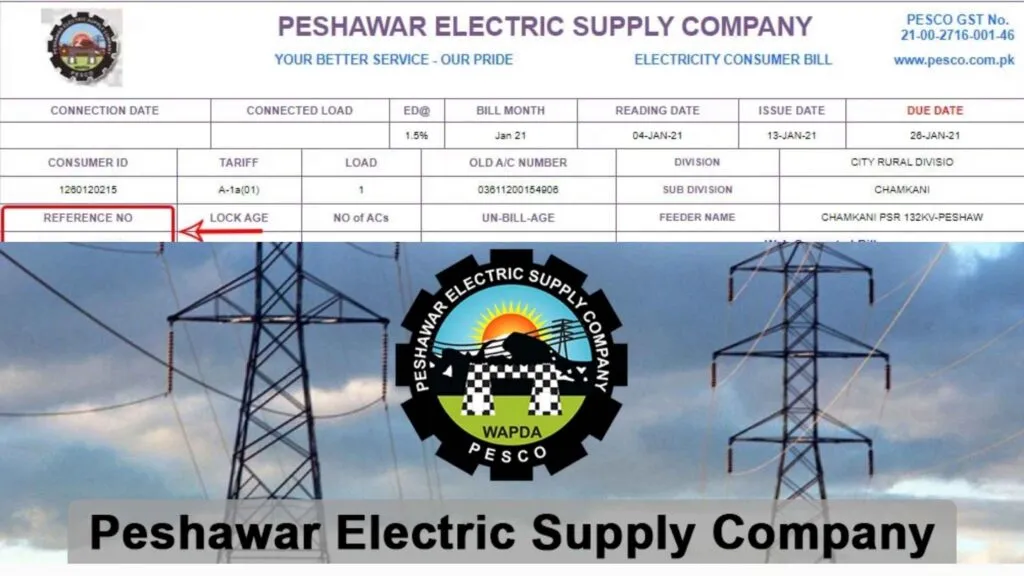
Here is the exact process to download your PESCO duplicate bill in PDF format:
- Open the official web billing page.
- Enter your 14-digit reference number carefully
- Click submit to view the latest billing details
- Press the print option displayed on the screen
- Save the file as PDF on your device
You can print this file for physical submission or keep it digitally for record purposes.
The duplicate bill includes:
- Billing month
- Due date
- Total payable amount
- Units consumed
- Taxes and surcharges
- Peak and off-peak readings (if applicable)
Consumers often search for “PESCO duplicate bill download” during peak summer months. According to energy usage data from Pakistan’s distribution companies, electricity demand increases significantly between May and August due to air conditioning usage.
Digital bill access prevents late payment penalties, which can increase the payable amount substantially.
If your bill does not appear, confirm that:
- Your connection is active
- The billing cycle has been generated
- The reference number belongs to PESCO and not another DISCO
You cannot retrieve bills using CNIC alone. The system strictly operates through reference numbers.
For historical records, only the latest generated bill is available online. Older billing history requires visiting a PESCO customer service center.
All Ways to Pay Your PESCO Bill Online (Apps, Banks & Digital Wallets)
Checking your bill is only half the process. Paying your PESCO bill online ensures you avoid late fees, disconnection notices, and long queues at banks.
Consumers in Pakistan now prefer digital payment channels due to convenience and real-time confirmation. According to the State Bank of Pakistan, digital retail transactions have grown consistently over recent years, reflecting increased trust in mobile banking and e-wallet systems.
Peshawar Electric Supply Company bills can be paid through multiple secure digital platforms.
1. Mobile Wallets (JazzCash & Easypaisa)
JazzCash and Easypaisa are widely used across Pakistan.
To pay using a mobile wallet:
- Open your wallet app
- Select “Bill Payments”
- Choose “Electricity”
- Select PESCO from the list
- Enter your 14-digit reference number
- Confirm the payable amount
- Authorize payment
Payment confirmation is usually instant.
2. Bank Mobile Applications
Major Pakistani banks allow electricity bill payments through their mobile apps. Examples include:
- HBL
- UBL
- MCB Bank
Steps are similar to wallet payments. Navigate to bill payments, choose electricity, select PESCO, and enter your reference number.
Most banks provide instant digital receipts within the app.
3. ATM & Internet Banking
If you prefer physical verification, ATMs also allow electricity bill payments using the reference number. Internet banking portals provide similar functionality.
4. Post Offices & Retail Agents
Although not strictly online, post offices and authorized retailers also accept duplicate printed bills.
Important Payment Notes
- Always verify the bill amount before confirming payment
- Save digital receipts for record
- Payments made on the due date should be completed before banking cut-off times
Late payments may attract surcharges as per the electricity tariff rules regulated by National Electric Power Regulatory Authority.
Digital payments reduce processing delays and ensure your account updates faster.
Understanding Your PESCO Electricity Bill Charges
Most consumers focus only on the total payable amount. Smart consumers review the breakdown. Understanding each component helps you identify billing errors and reduce unnecessary usage.
Peshawar Electric Supply Company follows tariff structures approved by National Electric Power Regulatory Authority.
Electricity tariffs vary by consumer category, including domestic, commercial, industrial, and agricultural connections.
Energy Charges (Units Consumed)
Energy charges are calculated based on units consumed during the billing period.
Your bill displays:
- Previous meter reading
- Current meter reading
- Total units consumed
Domestic tariffs operate under slab-based pricing. This means higher consumption results in higher per-unit charges.
For example, lower slabs are charged at reduced rates, while higher slabs apply progressive rates. This structure encourages energy conservation.
Fuel Price Adjustment (FPA)
Fuel Price Adjustment reflects changes in global fuel costs used for power generation.
If fuel prices increase, FPA rises. If global prices decline, FPA may reduce your payable amount.
FPA is typically calculated monthly and approved by NEPRA after review.
Taxes and Duties
Your bill may include:
- Electricity Duty
- GST
- Income Tax (for certain consumption levels)
- TV Fee (if applicable)
Taxes vary based on consumption category and government policy updates.
Fixed Charges
Fixed charges apply regardless of usage. These include:
- Meter rent
- Service charges
- Capacity charges (in some cases)
Even if your consumption is minimal, fixed charges remain applicable.
Peak and Off-Peak Charges
Some connections, especially three-phase or commercial, include peak-hour pricing.
Using heavy appliances during off-peak hours can reduce your overall bill significantly.
Why This Matters
Understanding your bill allows you to:
- Detect incorrect readings
- Monitor consumption trends
- Reduce peak-hour usage
- Plan energy-efficient upgrades
Electricity demand in Pakistan fluctuates seasonally. During summer months, consumption spikes due to cooling appliances, increasing total billing.
What Is the PESCO Reference Number and Where to Find It
Your PESCO reference number is the most important detail on your electricity bill. Without it, you cannot check, download, or pay your bill online.
Peshawar Electric Supply Company assigns a unique 14-digit reference number to every electricity connection. This number remains the same unless the connection category changes.
The billing system operated through PITC uses this number to retrieve your complete account details instantly.
Where Is the Reference Number Located?
You can find the 14-digit reference number on the top left section of your electricity bill.
It is usually labeled clearly as “Reference No.” and printed near your consumer name and address.
The format typically looks like this:
XX XXXX XXXXXXX
Each digit group helps the system identify:
- Distribution region
- Sub-division code
- Individual consumer account
Always enter all 14 digits without spaces when checking online.
Can You Check the Bill Without a Reference Number?
No. The system strictly requires the 14-digit reference number.
You cannot use CNIC, meter number, or phone number to retrieve your bill through the official portal.
If you lost your old bill copy and do not know your reference number:
- Visit your nearest PESCO subdivision office
- Call the customer service helpline
- Ask your landlord or property manager (for rented properties)
Why the Reference Number Matters
This number links directly to your:
- Billing history
- Payment record
- Tariff category
- Connection status
Entering an incorrect digit will result in a “No record found” message.
Keep a saved copy of your reference number in your phone notes to avoid repeated searching.
PESCO Bill Payment Status – How to Confirm Paid or Unpaid
Paid your bill but unsure whether the system updated it? Verifying payment status is essential to avoid disconnection notices or late payment surcharges.
Peshawar Electric Supply Company updates payment records through the centralized PITC billing system. Most digital payments reflect within minutes, but some bank transfers may take several hours.
Method 1: Recheck Your Bill Online
The simplest way to confirm payment is by revisiting the official bill portal.
If the bill is paid, the portal usually shows an updated status or zero outstanding dues.
If the same payable amount still appears, wait a few hours and refresh again.
Method 2: Check Through Your Bank or Wallet App
Mobile banking apps and wallets provide transaction history.
For example:
- JazzCash
- Easypaisa
- HBL
Open your transaction history and confirm that:
- The payment was successful
- The correct reference number was used
- The status shows “Completed” or “Successful”
Always save the digital receipt or screenshot for record.
Method 3: SMS or Helpline Verification
Some banks send SMS confirmations instantly after payment.
If in doubt, you can contact your nearest PESCO subdivision office with your reference number and payment proof.
Important Notes on Processing Time
- Wallet payments usually update instantly
- Interbank transfers may take 24 hours
- Payments after banking cut-off times may reflect the next working day
Late reflection does not mean non-payment, but monitoring is important.
If payment fails or shows “pending,” avoid repeating the transaction immediately. Confirm the status first to prevent double deduction.
Troubleshooting Common Problems When Checking PESCO Bill Online
Online billing systems are reliable, but occasional issues can occur. Most problems are minor and easy to fix without visiting a PESCO office.
Peshawar Electric Supply Company uses the centralized PITC platform, which serves millions of electricity consumers across Pakistan. High traffic during peak billing days can sometimes slow the system.
Issue 1: “No Record Found” Error
This is the most common problem.
Possible reasons include:
- Incorrect 14-digit reference number
- Missing digits or extra spaces
- Bill not yet generated for the current month
Always recheck the digits carefully. Even one incorrect number prevents the system from retrieving your account.
If the billing cycle is still in process, wait a few hours and try again.
Issue 2: Website Not Loading
The portal may slow down near due dates when thousands of users access it simultaneously.
Solutions:
- Refresh the page
- Clear browser cache
- Try accessing during off-peak hours
- Switch to mobile data if broadband is unstable
Issue 3: Payment Not Reflecting
If you paid through a wallet or bank app and the bill still shows unpaid:
- Wait up to 24 hours for interbank settlement
- Verify transaction success in your app history
- Confirm the reference number used during payment
Avoid making a second payment immediately without checking first.
Issue 4: Wrong Bill Amount Displayed
If the bill amount appears unusually high:
- Compare current units with previous month
- Check for peak-hour usage
- Review Fuel Price Adjustment charges
If you suspect meter reading errors, contact your subdivision office with previous bill copies.
Issue 5: Reference Number Unknown
If you lost access to your reference number:
- Check an older printed bill
- Ask your landlord if renting
- Visit your nearest PESCO office for assistance
Keeping a saved digital copy of your bill prevents repeated searching.
Understanding these quick fixes helps avoid unnecessary stress and physical visits.
How to Reduce Your PESCO Bill and Save Electricity Costs
Electricity tariffs are rising across Pakistan due to fuel adjustments and capacity charges. Managing consumption smartly can significantly reduce your monthly PESCO bill.
National Electric Power Regulatory Authority periodically revises electricity tariffs based on generation costs and fuel price movements. Consumers who monitor usage patterns consistently pay lower bills.
Monitor Monthly Consumption Trends
Start by comparing your last six months of unit consumption.
If your usage is steadily increasing, identify the cause. Seasonal appliances like air conditioners, heaters, and water pumps contribute heavily to higher slabs.
Staying within lower consumption slabs reduces per-unit charges.
Shift Usage to Off-Peak Hours
If you have a time-of-use meter, heavy appliances should operate during off-peak hours.
Running washing machines, irons, or water pumps at night can reduce peak-hour billing impact.
Peak-hour usage often costs more per unit.
Upgrade to Energy-Efficient Appliances
Replace outdated bulbs with LED lights.
Inverter air conditioners consume significantly less electricity than conventional models.
Energy-efficient refrigerators and fans also reduce long-term billing costs.
Eliminate Phantom Load
Many devices consume electricity even when switched off.
Unplug chargers, TVs, and routers when not in use. Standby consumption quietly increases your monthly units.
Regular Meter Reading Checks
Track your own meter reading weekly.
This helps you detect abnormal spikes early and prevents billing disputes.
Consider Solar Integration
Rooftop solar systems are expanding rapidly in Pakistan due to net metering policies.
Consumers generating part of their electricity reduce dependency on grid supply.
Alternative Energy Development Board promotes renewable adoption across the country.
Solar investment requires upfront cost but lowers long-term electricity expenses.
Reducing your electricity bill requires consistent monitoring, smart appliance usage, and tariff awareness.
Frequently Asked Questions About PESCO Bill Online
These questions are based on common “People Also Ask” queries searched by electricity consumers in Pakistan.
Can I Check PESCO Bill Online Without a Reference Number?
No. The official billing system requires your 14-digit reference number.
You cannot retrieve your bill using CNIC, meter number, or phone number through the online portal.
If you lost your reference number, visit your nearest PESCO subdivision office.
How Can I Download My PESCO Bill in PDF Format?
Visit the official billing portal and enter your reference number.
Once your bill appears, click the print option and save it as a PDF file.
The duplicate bill is legally valid for payment at banks and mobile wallets.
Why Is My PESCO Bill So High This Month?
Higher bills usually result from increased unit consumption, Fuel Price Adjustment charges, or moving into a higher tariff slab.
Compare your current units with previous months to identify unusual spikes.
If you suspect incorrect meter reading, contact your local office immediately.
How Long Does It Take for Online Payment to Reflect?
Wallet payments typically reflect within minutes.
Bank transfers may take up to 24 hours depending on settlement timing.
Always save your transaction receipt as proof of payment.
Can I Pay PESCO Bill After Due Date?
Yes, but late payment surcharge applies according to tariff rules regulated by National Electric Power Regulatory Authority.
Repeated late payments may lead to disconnection notices.
Final Thoughts
Checking your PESCO bill online saves time, prevents penalties, and gives you full control over your electricity expenses.
Digital access, smart payment methods, and careful monitoring of consumption can significantly reduce financial stress.
Keep your 14-digit reference number saved and check your bill monthly to stay ahead of due dates and rising tariffs.
For instant access, always use the official PITC billing portal and verify your payment confirmation carefully.