
Check Sim Owner Details Online in Pakistan (2026)
By Sobia Sultan
If you want to check SIM owner details online in Pakistan, the safest and only official way is to use the Pakistan Telecommunication Authority (PTA) services. You can either SMS your 13-digit CNIC number to 668 or visit cnic.sims.pk to see how many SIM cards are registered against your own identity. These official methods let you perform a SIM owner details online check by CNIC or SIM number check by CNIC online, but they do not reveal another person’s name, phone number, or address. Whether you’re doing a routine pak sim data check or looking for fresh sim owner details after getting a new connection, these are the only two legitimate starting points.
You can also download this app on Google Play to check sim owner details.
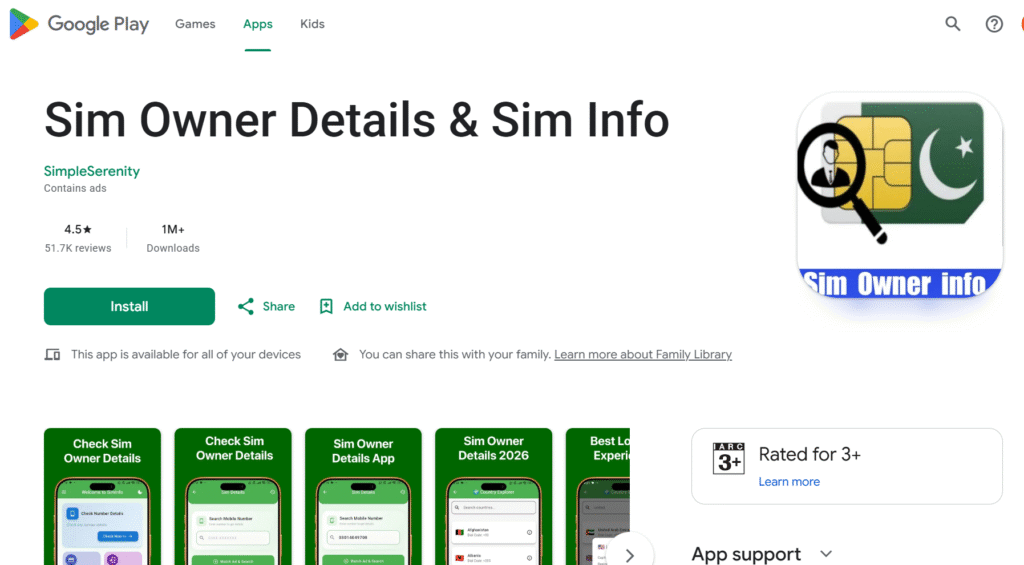
Many people search for phrases like sim owner details online check by number Pakistan free, check sim owner details by number, pak sim owner details, or sim number owner details online check. In reality, there is no legal public database in Pakistan that allows anyone to look up another person’s SIM ownership using only a mobile number. Websites and apps making such claims usually rely on outdated leaked information, fake databases, or misleading advertisements. Others look specifically for sim details in Pakistan by number, mobile sim owner details, or a general pak sim information system that lists every registered connection — none of these exist as public, searchable tools.
This guide explains everything you need to know about SIM owner details in Pakistan (2026), including how the official verification system works, how to identify unauthorized SIMs linked to your CNIC, the legal position under PECA 2016, and what to do if you receive suspicious calls or discover an unknown SIM registered in your name.
Quick Answer:
To check SIM owner details online in Pakistan, send your 13-digit CNIC to 668 or visit cnic.sims.pk. These official PTA services only show the number of SIMs registered against your own CNIC. There is no official PTA service that allows you to check another person’s SIM owner details by mobile number.
What “Sim Owner Details” Actually Means
The phrase SIM owner details refers to the subscriber information linked to a mobile SIM card in the records maintained by the Pakistan Telecommunication Authority (PTA) through the Subscriber Verification Management System (SVMS). Every active SIM issued by operators such as Jazz, Zong, Ufone, Telenor, SCOM, and ONIC is connected to a verified identity after biometric verification.
Whenever you purchase a new SIM card, the retailer captures your fingerprint during biometric verification. That fingerprint is matched with your Computerized National Identity Card (CNIC) through NADRA. Once the verification is successful, the SIM becomes permanently associated with your identity inside the SVMS database. This verified subscriber record is commonly referred to as your SIM owner details or SIM registration record.
Many users search online for terms such as sim data Pakistan 2026, pak sim info, or sim owner details online expecting to find a searchable database of mobile numbers. However, Pakistan’s official verification system is designed to protect personal privacy. The public cannot search the database using someone else’s phone number. Some even search paksiminfo as one word, or ask directly whether sim owner details by NADRA is a real, separate service — it isn’t; NADRA only handles the biometric matching behind the scenes and does not run its own lookup tool.
Instead, the official system allows you to verify only the SIMs registered under your own CNIC.
A verified SIM registration record typically includes:
- Full name exactly as printed on your CNIC
- 13-digit CNIC number
- Mobile network operator (Jazz, Zong, Ufone, Telenor, SCOM, or ONIC)
- SIM activation date
- Biometric verification status
- Current SIM status (active, blocked, or inactive)
One important point often misunderstood is that PTA never displays another person’s personal information. Even when you perform an official SIM owner details online check, the system only tells you how many SIMs are registered against your own identity. It does not display someone else’s name, mobile number, address, or CNIC. This privacy safeguard is built into Pakistan’s subscriber verification framework and exists to protect citizens from identity misuse and unauthorized access to personal data.
Sim Owner Details Online Check — The Two Free, Official Methods
If you are searching for a SIM owner details online check in Pakistan, you should only rely on the official services provided by the Pakistan Telecommunication Authority (PTA). Whether you search for sim owner details online check PTA, sim owner details online check by CNIC Pakistan, or SIM number details online check, the answer is the same—PTA offers only two official methods, and both allow you to verify SIMs registered under your own CNIC.
These services are designed to protect your identity and help you detect unauthorized SIM registrations. They do not reveal another person’s personal information.
Method 1: SMS Your CNIC to 668
The quickest way to perform a SIM owner details online check by CNIC is through PTA’s SMS service.
Here’s how it works:
- Open your phone’s Messages app.
- Type your 13-digit CNIC number without dashes or spaces.
- Send it to 668.
- Wait for the response.
Within a few seconds, PTA sends an SMS showing how many SIM cards are registered against your CNIC with each mobile operator.
For example, the response may display something like:
- Jazz – 2 SIMs
- Zong – 1 SIM
- Ufone – 1 SIM
- Telenor – 0 SIMs
- ONIC – 1 SIM
- SCOM – 0 SIMs
The service costs approximately Rs. 2 (including taxes).
Although many people search for sim owner details online check by number Pakistan free, the 668 service works only with your own CNIC and does not identify another person’s mobile number or subscriber information.
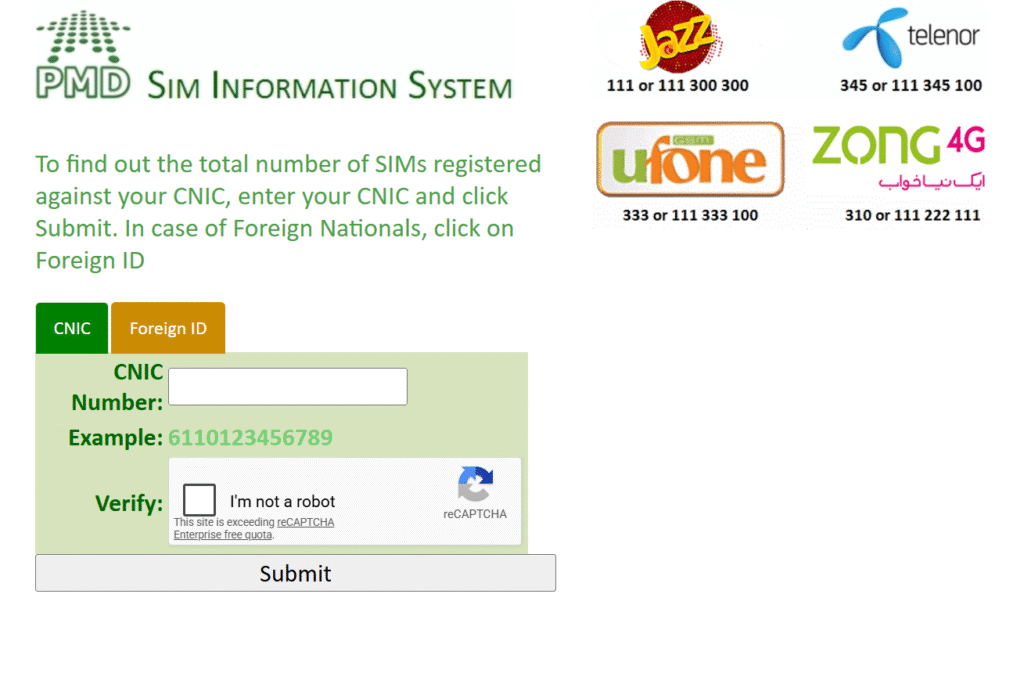
Method 2: Check SIM Owner Details Online at cnic.sims.pk
If you prefer not to use SMS, you can perform a SIM owner details online check through PTA’s official online portal.
Simply visit:
cnic.sims.pk
Then:
- Enter your 13-digit CNIC or NICOP number.
- Complete the CAPTCHA verification.
- Click Submit.
The portal instantly displays the number of SIMs registered against your identity across all Pakistani mobile operators.
Unlike the SMS service, this method is completely free and is especially useful for overseas Pakistanis who want to verify their registered SIMs without sending an SMS from Pakistan.
If you searched for:
- sim owner details online check Pakistan
- sim number check by CNIC online
- pak sim owner details
- pak sim info
this is the official service you should use.
Beware of Fake SIM Owner Details Websites
Many websites claim to offer SIM owner details online check by number, promising to reveal someone’s name, CNIC, address, or family information after entering a mobile number.
These websites are not affiliated with PTA or NADRA.
In most cases, they:
- Display fake or randomly generated information.
- Recycle outdated data from old leaks.
- Collect visitors’ phone numbers and CNICs.
- Earn advertising revenue by misleading users.
- May expose your personal information to cybercriminals.
Some even imitate the appearance of government websites by using similar domain names.
Always verify that you are visiting the official PTA portal before entering your CNIC. The correct address is:
cnic.sims.pk
If the website asks for unnecessary personal information, promises to reveal another person’s identity, or requests payment for SIM ownership information, it should be treated as suspicious.
SIM Owner Details by Number — Is It Really Possible?
This is one of the most searched questions in Pakistan.
People frequently search for:
- check sim owner details by number
- sim owner details by number Pakistan
- check sim owner name by mobile number
- sim number owner details online check
- sim owner details online check by number
- real sim owner details or a “live tracker” for sim owner details
- sim owner details website that claims to show sim card owner details Pakistan-wide
The simple answer is: No.
There is no legal public service in Pakistan that allows you to identify the owner of a mobile number simply by entering the phone number.
Neither PTA, NADRA, nor any mobile operator provides a public lookup tool for this purpose.
The official subscriber database is protected by privacy laws and can only be accessed by authorized government agencies under legal procedures.
If a website claims you can type any mobile number and instantly receive:
- Full name
- CNIC number
- Home address
- Family details
- Live location
it is almost certainly displaying fake information or data obtained through unauthorized sources.
Why Do Some Websites Claim They Can Show SIM Owner Details?
Many users wonder why so many websites appear in search results claiming to offer SIM owner details online or SIM owner details by number Pakistan.
The answer is simple.
These platforms generally fall into one of two categories.
1. Fake Lookup Websites
These sites generate random names or display fabricated records simply to increase page views and advertising revenue.
Their goal is not to help users—it is to keep visitors clicking through multiple pages.
2. Websites Using Old Leaked Databases
Some services rely on outdated information stolen during previous data breaches.
Such records are often years old, incomplete, inaccurate, and unauthorized.
They do not reflect the current subscriber information maintained by PTA or mobile operators. If a site or app is advertising itself as offering “free sim owner details” with no cost and no CAPTCHA, treat that as a warning sign rather than a convenience — the only genuinely free, official option is cnic.sims.pk.
Using these services may violate privacy laws and could expose your own personal information.
The Legal Position in Pakistan
Pakistan’s subscriber information is protected under the Prevention of Electronic Crimes Act (PECA) 2016.
Accessing another person’s identity information without authorization may result in criminal penalties, including imprisonment and fines.
For that reason, the only legal SIM owner details online check is one performed for your own CNIC using PTA’s official verification services.
If your concern involves spam calls, fraud, harassment, or unknown callers, there are lawful reporting mechanisms discussed later in this guide that are far more effective than relying on unofficial SIM lookup websites.
What About SIM Owner Details Apps and APKs?
Search for SIM owner details on Google or YouTube, and you’ll quickly come across dozens of apps and APK files claiming they can reveal the owner of any Pakistani mobile number. Many of these apps advertise features like SIM owner details online check, check SIM owner name by mobile number, or SIM owner details by number Pakistan with just a single tap.
If something sounds too good to be true, it usually is.
Neither PTA nor NADRA provides a public mobile application that lets users search another person’s SIM registration details. Any app claiming to access Pakistan’s official subscriber database is misleading users.
Most of these applications fall into three categories.
1. Fake Lookup Apps
These apps simply display randomly generated names or recycled information to convince users that the search was successful.
Their real purpose is to generate advertising revenue rather than provide accurate information.
You may notice that every search appears to return a result, even when you enter a fake phone number. That alone is a clear indication the data is not coming from any official source.
2. Apps Using Old Leaked Data
Some applications claim to provide SIM data Pakistan 2026 or maintain a massive Pak SIM info database.
In reality, they usually rely on outdated information obtained from historic data breaches. These databases are often incomplete, inaccurate, and several years old.
Subscriber information changes every day as people:
- purchase new SIMs,
- port their numbers to another network,
- block lost SIMs,
- replace damaged SIM cards,
- or complete biometric re-verification.
An old leaked database cannot reflect these changes and should never be considered reliable.
3. Apps That Collect Your Information
Instead of helping you perform a SIM owner details online check, these apps may be collecting your own personal information for advertising or other unauthorized purposes.
For that reason, cybersecurity experts consistently recommend avoiding unofficial SIM lookup applications.
Is There an Official PTA or NADRA App?
No.
There is currently no official PTA or NADRA application for checking another person’s SIM ownership.
If you want to verify your own registered SIMs, use only:
- 668 SMS Service
- cnic.sims.pk
These are the only official services available for conducting a SIM owner details online check in Pakistan.
Any application claiming to provide:
- SIM owner details by mobile number,
- check SIM owner name by mobile number,
- live SIM database,
- or unlimited SIM lookup,
should be treated with caution.
Another question that frequently appears alongside SIM owner details online check is:
How many SIM cards can one person legally own in Pakistan?
The answer is straightforward.
Under Pakistan’s current regulations, an individual may register a maximum of eight SIM cards against one CNIC.
These include:
- Five voice SIMs
- Three data-only SIMs
This limit applies collectively across all licensed mobile operators, including:
- Jazz
- Zong
- Ufone
- Telenor
- ONIC
- SCOM
For example, you could have:
- 2 Jazz SIMs
- 2 Zong SIMs
- 1 Ufone SIM
- 1 ONIC SIM
- 2 data SIMs
provided the total does not exceed the permitted limit.
Many websites still mention limits of six or even twenty-five SIMs, but those figures are outdated and should not be relied upon.
Special Cases
Some categories of users follow different registration rules.
Foreign Nationals
Foreign passport holders and POC holders may register SIM cards using valid immigration documents, subject to operator verification and regulatory limits.
Overseas Pakistanis
Pakistanis holding a NICOP can still perform a SIM owner details online check through the official PTA portal if they wish to verify SIMs registered under their identity.
Corporate Connections
Businesses register SIMs under their National Tax Number (NTN) rather than an individual’s CNIC.
This allows organizations to maintain multiple employee connections while remaining compliant with PTA regulations.
Children
A SIM card cannot normally be registered in the name of a child until they possess a valid CNIC and complete biometric verification.
Found an Unknown SIM on Your CNIC? Here’s What to Do
One of the biggest reasons people search for SIM owner details online check Pakistan is to verify that nobody has obtained a SIM card using their identity.
If your official PTA check shows a SIM you don’t recognize, act immediately.
Every SIM registered against your CNIC is legally associated with you. If someone uses that connection for fraud, cybercrime, financial scams, or harassment, investigators may initially trace the number back to your identity.
That makes regular SIM number details online checks an important security practice.
Step 1 — Save Proof
Take a screenshot of your results from:
- 668 SMS
- cnic.sims.pk
Make sure the date and time are visible.
Step 2 — Contact Your Mobile Operator
Immediately call the relevant operator.
| Operator | Helpline |
|---|---|
| Jazz | 111 |
| Zong | 310 |
| Ufone | 333 |
| Telenor | 345 |
| SCOM | 355 |
| ONIC | Official customer support |
Explain that an unknown SIM appears during your SIM owner details online check and request immediate verification.
Step 3 — Visit the Franchise
Take your original CNIC to the nearest customer service center.
Ask for:
SIM Disowning
Staff will verify your biometric information before removing unauthorized connections from your CNIC.
Step 4 — File a PTA Complaint
If the issue remains unresolved, submit a complaint through PTA’s official complaint system or contact its helpline.
This creates an official record showing that you reported the unauthorized SIM as soon as you discovered it.
Step 5 — Secure Your Digital Accounts
If the unknown SIM may have been used for fraud:
- Change your online banking passwords.
- Update mobile wallet credentials.
- Enable two-factor authentication using an authenticator app.
- Review your account activity for suspicious logins.
Taking these precautions can prevent identity theft even if someone has attempted to misuse your personal information.
Someone Is Calling You Nonstop From an Unknown Number? Do This
Many people search for check SIM owner details by number, check SIM owner name by mobile number, or SIM owner details by number Pakistan because they are receiving repeated calls or messages from an unknown number.
The first reaction is often to search for the caller’s identity online.
However, the better approach is to deal with the problem safely and legally instead of relying on unofficial SIM owner details online check websites.
If someone repeatedly calls or sends suspicious messages, follow these steps.
Block the Number
Use your phone’s built-in blocking feature or dial your operator’s blocking code where available.
Blocking the caller immediately prevents further nuisance calls without exposing your own information.
Report Spam Messages
If you receive fraudulent SMS messages or suspicious marketing texts, forward them to 9000.
Pakistan’s telecom authorities and mobile operators use these reports to investigate spam campaigns.
Register for the Do Not Call Service
If unwanted promotional calls continue, register your number with Pakistan’s Do Not Call Register.
This helps reduce telemarketing calls from registered companies.
Report Threats or Harassment
If the calls involve harassment, blackmail, fraud, or threats, report the matter immediately to the National Cyber Crime Investigation Agency (NCCIA).
Unlike public users, NCCIA has legal authority to request subscriber information from mobile operators during official investigations.
This is the lawful alternative to searching for SIM owner details by number on unofficial websites.
Never Share OTP Codes
Fraudsters often pretend to represent:
- PTA
- NADRA
- Your bank
- Jazz
- Zong
- Ufone
- Telenor
- ONIC
They may ask you to share a One-Time Password (OTP) to “verify your SIM.”
Never provide OTP codes over the phone.
No legitimate government department or telecom operator requests OTP verification through unsolicited phone calls.
Is Truecaller the Same Thing as an Official Sim Owner Details Check?
No.
This is another common misunderstanding.
Many users believe Truecaller performs a SIM owner details online check or connects directly to PTA records.
It does not.
Truecaller works by collecting names from users’ contact lists.
If enough people save a number as “Ali Khan,” Truecaller may display that name to other users.
That does not mean Ali Khan is the legal owner of the SIM.
The information shown may be:
- outdated,
- incomplete,
- misspelled,
- a nickname,
- a company name,
- or entirely incorrect.
Official subscriber information remains available only through Pakistan’s regulated telecom system and cannot be accessed through Truecaller.
Think of Truecaller as a community-powered caller identification service rather than a SIM owner details online database.
SIM Swap Fraud — Why Checking Your Own SIM Details Matters
Another reason many people perform a SIM owner details online check Pakistan is to protect themselves from SIM swap fraud.
SIM swap fraud occurs when criminals convince a mobile operator to issue a replacement SIM using someone else’s identity.
Once activated, the victim’s phone loses network coverage while the criminal receives:
- banking OTPs,
- password reset codes,
- authentication messages,
- mobile wallet verification codes.
In many financial fraud cases, the first warning sign is that your phone suddenly shows “No Service” even though the network is available.
If that happens unexpectedly:
- contact your mobile operator immediately,
- verify your SIM status,
- review your registered SIMs through PTA,
- and secure your online accounts.
Checking your registered SIM count regularly is one of the simplest ways to identify unauthorized activity before it becomes a serious security issue.
Protect Yourself Against SIM Fraud
Good digital security habits are far more effective than searching unofficial SIM owner details apps.
Experts recommend that you:
- Perform a SIM owner details online check every month.
- Enable two-factor authentication using an authenticator app instead of SMS whenever possible.
- Set a SIM PIN to prevent unauthorized use.
- Enable WhatsApp Two-Step Verification.
- Keep your CNIC information secure.
- Report lost or stolen SIM cards immediately.
Regular verification takes less than a minute but can help prevent identity theft and financial fraud.
Is It Legal? PECA 2016 in Simple Words
Checking your own CNIC is completely legal, and PTA actually encourages it. The law only becomes a problem when you try to access someone else’s identity information without permission.
| Section | What it covers | Maximum punishment |
|---|---|---|
| Section 3 | Accessing a system or data without permission | 3 months, Rs 50,000, or both |
| Section 4 | Copying or sending data without permission | 6 months, Rs 100,000, or both |
| Section 16 | Using someone else’s identity information without permission | 3 years, Rs 5,000,000, or both |
| Section 17 | Issuing a SIM card fraudulently | 3 years, Rs 500,000, or both |
The important phrase here is “without authorisation.” You are always authorised to check your own record. You are never authorised to look up a stranger’s. That single line is the whole legal boundary of this topic.
Sim Owner Details by Operator: Jazz, Zong, Telenor, Ufone
Every operator gives you a quick way to check your own number and biometric status. This is also where a zong sim owner details or sim owner details ufone search usually leads people — to a self-check code, not a lookup of someone else’s line.
| Network | Check own number | Biometric status code | Helpline |
|---|---|---|---|
| Jazz | Dial *99# | SMS CNIC to 6001 | 111 |
| Zong | Dial *8# | Send V to 7911 | 310 |
| Telenor | Dial *8888# | SMS CNIC to 7751 | 345 |
| Ufone | Dial *780*3# | Send V to 7911 | 333 |
Note that Telenor Pakistan formally merged into PTML, the company behind Ufone, after Islamabad High Court approval on 30 June 2026. Both brands and codes are still active for now, so re-check with the operator if a code stops working.
Common Mistakes People Make
- Adding dashes to the CNIC number. The 668 system needs 13 plain digits, nothing else.
- Trusting a look-alike website. Only cnic.sims.pk is official. A similar spelling is not the same site.
- Expecting a phone number or a full name in the 668 reply. The system only ever returns a count, by design.
- Believing a “sim owner details app” from an app store. No official government app works this way.
- Assuming a phone’s prefix always shows its current network. After number portability, a 0300 number can belong to any network now. SMS the number to 76367 to confirm its live network.
Frequently Asked Questions
How do I check sim owner details in Pakistan?
SMS your 13-digit CNIC, with no dashes, to 668, or enter it on the free portal cnic.sims.pk. You get an operator-wise count of the SIMs on your own CNIC in under a minute.
Can I check sim owner details by number?
No. There is no legal public tool that reveals a stranger’s name, CNIC, or address from a phone number. Any site claiming this is either fake or illegal to use.
How many SIMs can I have on one CNIC?
Eight in total: five voice SIMs and three data-only SIMs, combined across all networks. This limit has stayed the same since the Supreme Court set it on 5 November 2015.
Is checking sim owner details online free?
Yes, if you use cnic.sims.pk. The 668 SMS method works too, but it costs about Rs 2 including tax.
Is the Nadra sim owner details app real?
NADRA does not run a public app for checking sim owner details. It only handles the fingerprint step behind SIM activation. Any app using the NADRA name for a lookup service is not official.
What should I do if I find an unknown SIM on my CNIC?
Screenshot the result, call the operator’s helpline, visit the franchise for SIM disowning with your original CNIC, and file a complaint with PTA at 0800-55055.
Is it safe to use a sim owner details apk from outside the Play Store?
No. These files often carry malware and never connect to any real government database. Stick to the official methods listed above.
What is the difference between 668 and 667?
668 uses your CNIC and shows every SIM registered under it. 667 checks only the one SIM currently in your phone, confirming its network and status.
Can overseas Pakistanis check their sim owner details?
Yes. cnic.sims.pk works from any country, using a CNIC or a NICOP card, so a Pakistani SIM is not required.
Is looking up someone else’s SIM information illegal?
Yes. Section 16 of PECA 2016 makes unauthorised access to someone else’s identity information a crime, carrying up to three years in jail and a fine up to Rs 5 million.
Is there a pak sim data check that works for a business connection?
Yes — corporate SIMs are registered under the company’s National Tax Number (NTN) rather than a personal CNIC, so a business owner checking sim owner details for a company line should confirm the count through their NTN records with the operator, not through the personal 668/cnic.sims.pk services.
Where can I check fresh sim owner details right after activating a new SIM?
The same two official channels — 668 SMS or cnic.sims.pk — update in real time, so you can confirm a newly activated SIM appears under your CNIC within minutes of biometric verification.
This guide is reviewed for accuracy against PTA, NADRA, the Supreme Court of Pakistan, and named news sources. We do not run lookups, store CNIC numbers, or sell data. Last reviewed: 26 July 2026.