
Electricity Subsidy QR Code Registration: Complete Step-by-Step Guide (2026)
By Aftab Ahmed
If your monthly electricity bill shows 200 units or less, the government of Pakistan classifies you as a Protected Consumer. Protected consumers get a special discount on their electricity bill. But now, to keep receiving this subsidy, every consumer must complete a new process called QR code registration.
In this guide, we explain everything in simple words:
- What the electricity subsidy QR code registration is
- Who is eligible for it
- How to register step by step
- What to do if something goes wrong
- How to avoid scams
What Is the Cross Subsidy Program?
The Cross Subsidy Program is a government initiative designed to give affordable electricity to low-consumption households.
The National Electric Power Regulatory Authority (NEPRA) sets electricity rates in slabs. The more units a household uses, the higher the rate charged. But households that use less electricity every month are protected from this higher rate. This protection is called cross subsidy.
According to Federal Minister for Energy Awais Leghari, around 29.57 million domestic consumers — about 86% of all households — currently receive this subsidy across Pakistan. The total subsidy amount has grown from Rs 199 billion to Rs 423 billion.
Important: The government has made clear that the subsidy itself is not being withdrawn. QR code registration is being introduced only to make sure the subsidy reaches genuine, deserving consumers.
- Check IESCO Bill Online in 2026
- Check Mepco Bill Online| Download Duplicate Bill
- Check FESCO Bill Online in 2026
- Check KE Duplicate Bill in 2026
Why Is Electricity Subsidy QR Code Registration Necessary?
Earlier, subsidy was given simply by checking the units shown on the meter. This older system had some weaknesses:
- Some people misused their connections to stay under the subsidy limit
- Multiple connections in one house sometimes claimed subsidy separately
- Commercial users sometimes received subsidy meant for domestic households
To fix these problems, the Ministry of Energy decided that every protected consumer must verify their identity. This verification happens through a QR code printed on the electricity bill.
Who Is Eligible for QR Code Registration?
Not every consumer qualifies for this subsidy. Here are the actual eligibility rules checked jointly by the Pakistan Information Technology Company (PITC) and your electricity company:
- Domestic meter only: Your connection must be registered under the domestic tariff, not commercial or industrial
- Six-month average usage: Your average consumption over the last six billing cycles must fall within the protected limit (generally up to 200 units per month; some categories are capped at 100 units)
- One CNIC, one connection: A single national identity card cannot be used to register more than one connection for subsidy
- Valid, verified mobile number: Your SIM must be PTA biometric-verified
If you recently installed a solar system and your units dropped below 200 as a result, the government is reviewing such cases separately so that genuinely needy consumers are not affected.
How to Register Through the QR Code (Step by Step)
The process below works the same way for consumers of all electricity companies — FESCO, LESCO, MEPCO, IESCO, PESCO, GEPCO, HESCO, SEPCO, QESCO, TESCO, and HAZECO — because PITC manages the system centrally for every distribution company.
Step 1: Get Your Latest Electricity Bill
Keep your most recent electricity bill ready. A QR code is printed on it. Always use the code from your own original bill, not a photocopy or an old bill.
Step 2: Scan the QR Code With Your Phone Camera
Open your phone’s camera and point it at the QR code. Most modern smartphones recognize the code automatically and show a link.
Step 3: Open the Link and Check the Reference Number
Tapping the link takes you to PITC’s official portal. In some cases, the reference number printed on your bill fills in automatically; otherwise, you may need to enter it yourself.
Step 4: Enter Your CNIC Number
Type your 13-digit national identity card number. Most portals automatically format it correctly (XXXXX-XXXXXXX-X). Even one wrong digit will cause the form to reject your entry.
Step 5: Enter Your Registered Mobile Number
Enter the mobile number that is biometric-verified against your CNIC. If your SIM is not biometric-verified, visit any Jazz, Telenor, Zong, or Ufone franchise with your CNIC to get it verified — this is free and takes only a few minutes.
Step 6: Enter the OTP
Click “Send OTP.” A one-time password will arrive on your phone by SMS. You usually need to enter it within a few minutes, or you’ll have to request a new one.
Step 7: Complete Verification and Check Your Status
Once you enter the OTP, registration is complete. The portal will show your current subsidy status. This information is saved and will automatically apply to your future bills.
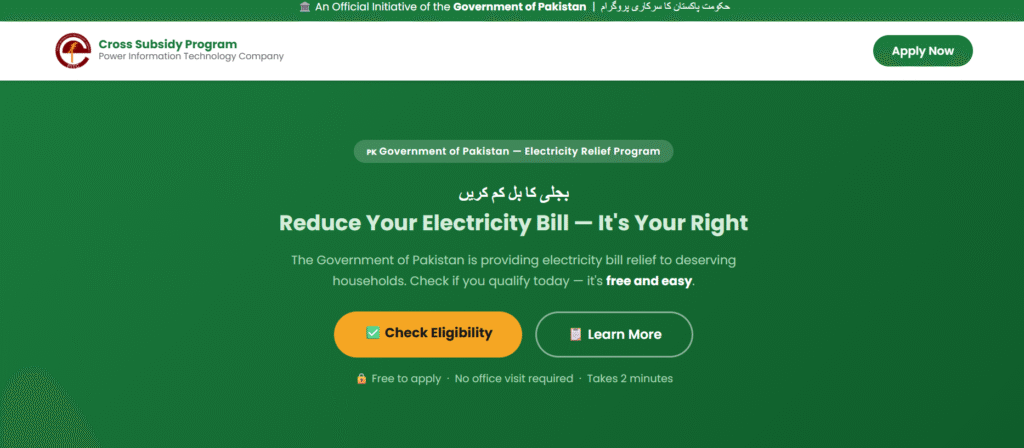
If the QR code doesn’t scan, don’t worry. You can go directly to the Cross Subsidy Program registration website and enter your details manually.
Common Problems and Their Solutions
Some consumers face difficulties during registration. Here are the most common issues and simple fixes:
- QR code won’t scan: Clean your camera lens, improve lighting, or use the original printed bill instead of a photocopy
- OTP not arriving: Check your mobile signal, wait a few minutes, then request the OTP again
- “Reference number not found” error: Recheck the number carefully — even a single wrong digit causes this error
- SIM not biometric-verified: Visit your mobile operator’s franchise to get it re-verified
- Website loading slowly: The portal gets heavy traffic during the day; try early morning or late at night
How to Avoid Scams
Wherever a government campaign like this runs, scammers try to take advantage. Keep these points in mind:
- Only use the QR code printed on your own original electricity bill
- Never enter your CNIC number or OTP through an unknown WhatsApp link, Facebook post, or random SMS link
- Your electricity company or PITC will never call you and ask for your OTP over the phone
- Always check the website address (URL) before entering any personal details — use only official, verified domains
- If someone calls claiming they will “cut off your subsidy” unless you pay immediately, this is a scam — hang up
What Happens If You Don’t Register?
According to the Faisalabad Electric Supply Company (FESCO), around 3.95 million consumers in the FESCO region alone are eligible for this subsidy. Of these, over 1.71 million have already completed registration, while more than 2.23 million consumers have not yet completed the process.
If you haven’t registered yet, you may face difficulties receiving your subsidy in the future. It’s best to complete the QR code verification on your bill as soon as possible.
Frequently Asked Questions
Q: Will my subsidy stop immediately if I don’t complete QR code registration?
No, it won’t stop immediately, but electricity companies are warning that future subsidy could be affected. It’s better to register as soon as possible.
Q: Can I register if I don’t own a smartphone?
You need a smartphone to scan the QR code, but if you don’t have one, you can use a trusted family member’s phone. Just make sure the OTP is sent to your own registered mobile number.
Q: I have a solar system installed and my units are already low — do I still need to register?
Yes. If your average consumption falls within the protected limit, registration is required, regardless of why your usage is low.
Q: Is there any fee for registration?
No, this process is completely free. If anyone asks for a fee, it’s a scam.
Q: I’m a customer of a different electricity company — is the process the same?
Yes. Whether you’re with FESCO, LESCO, MEPCO, IESCO, or any other electricity company, PITC manages the registration system centrally, so the process is identical.
Final Word
Electricity subsidy QR code registration is a simple but important task. It takes only a few minutes but plays a big role in protecting your subsidy. Get your bill, scan the code, and complete your registration today.
If you run into any problem, don’t panic — contact your electricity company’s customer service center or ask a trusted person for help.