
SNGPL Duplicate Bill – Download & Print Easily (Quick Guide)
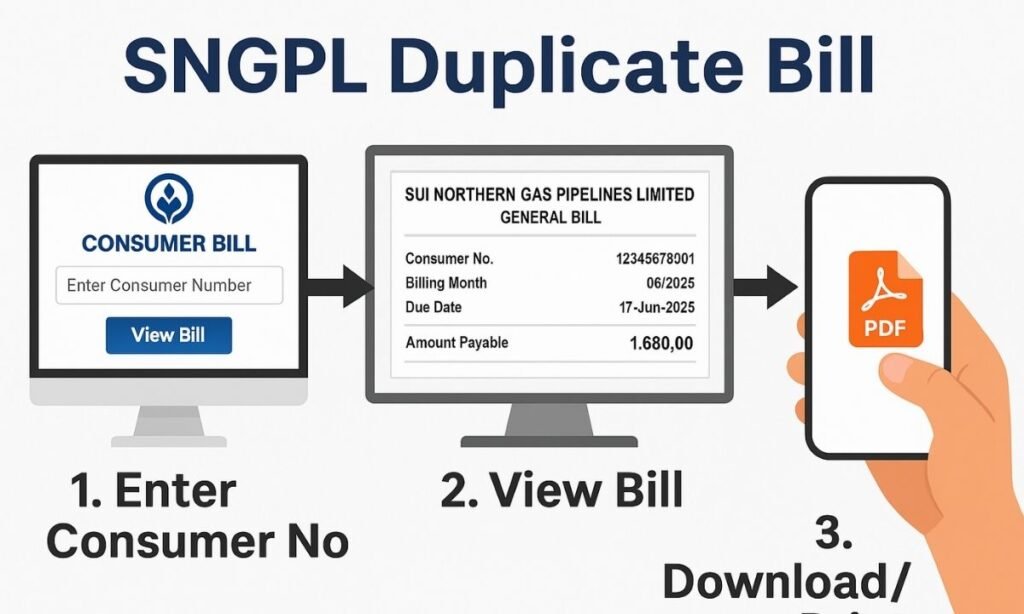
If you’ve lost your Sui Northern Gas Pipelines Limited (SNGPL) gas bill or didn’t receive it on time, you can instantly check, download and print your duplicate bill online. In this guide you’ll get the exact steps, required details, possible hiccups and all you need to know about the SNGPL duplicate bill process in Pakistan.
Read More: How To Check And Pay SNGPL Bill Online 2025
Key Takeaways : How to Download SNGPL Duplicate Bill
Why You Might Need a Duplicate SNGPL Bill
You may miss your original monthly bill and still need proof of consumption or payment. Many users lose the physical copy or fail to receive it due to postal delays.
Obtaining a SNGPL duplicate gas bill help you avoid late payment surcharges and maintain your record-keeping.
For instance, if your bill didn’t arrive and you waited, you could incur a late fee or even risk supply interruption.
With the online “duplicate bill” service by SNGPL, you regain access to your monthly invoice in minutes. Additionally, you may need a duplicate bill for rental/ownership documentation (e.g., moving house, property transfer) or simply for digital archiving.
Even, it may require to pay property tax if you are living in Punjab. According to the SNGPL annual report, the company serves over 7.5 million consumers across Punjab, Khyber Pakhtunkhwa and Azad Kashmir.
You must know that requirement of a duplicate bill doesn’t mean there is an error—it is simply a backup copy. By proactively obtaining the duplicate bill online, you reduce frequent queries to customer centres and eliminate delays caused by physical delivery.
What the SNGPL Duplicate Bill Service Offers
The duplicate bill service offered by SNGPL allows you to:
This service enhances convenience for consumers: you no longer have to wait for the paper bill to arrive in your mailbox.
You avoid physical filing, and you can instantly verify the bill amount, due date and units consumed.
Additionally, it caters to consumers nationwide in SNGPL’s coverage area including Islamabad, Lahore, Faisalabad, Azad Kashmir and Khyber Pakhtunkhwa.
With digital access you’re also better placed to monitor consumption trends month-to-month, check if any surge in usage occurred and spot possible billing errors. It boosts transparency and consumer empowerment.
Step-by-Step: How to Check and Download Your Duplicate Bill Online
Here’s a process you can follow to get your SNGPL duplicate bill in just a few minutes:
Visit the official SNGPL website and find the “Customer Service” and Click on it to find out “Get Your Bill’ option.
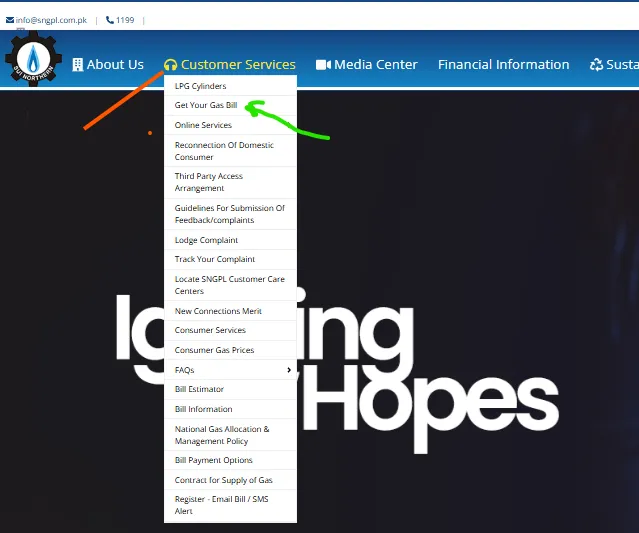
Click on the “Get Your Gas Bill”. It will take you to the section of entering your 11-digit or 14-digit consumer number/account ID (printed on your old bill).
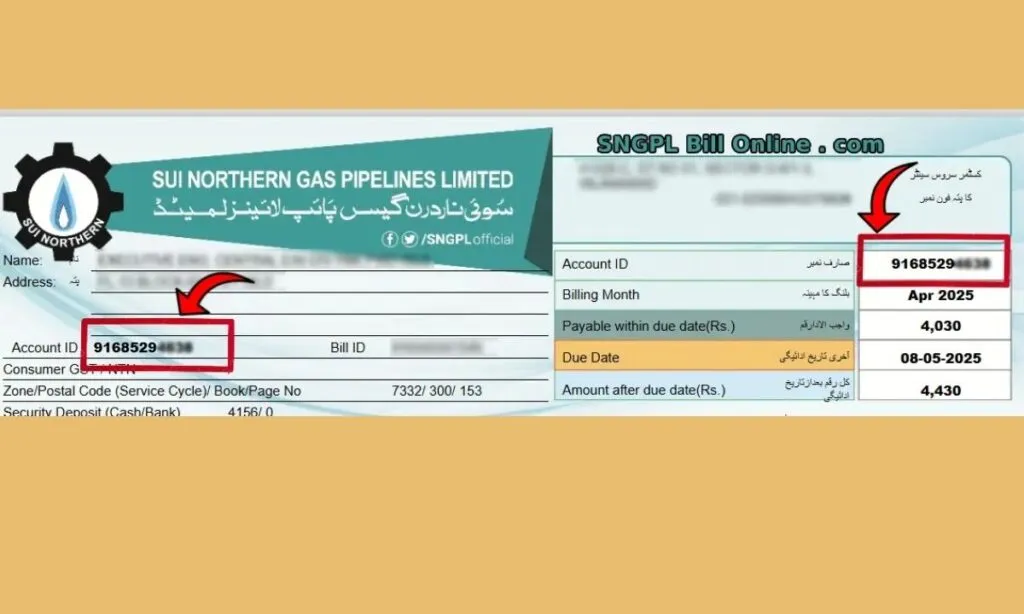
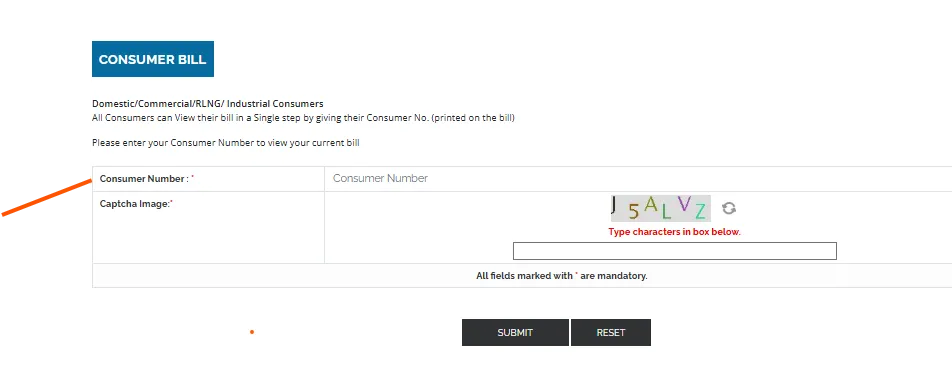
Solve any captcha or verification if prompted. Your duplicate bill will display on-screen. Options will appear: Download (PDF), Print or Save.
You can Click Download to store the bill on your device or click Print to send to a printer. Once downloaded or printed, you can proceed to payment if required—via internet banking, mobile banking or branch.
Pro tip: Save the PDF in a folder labelled “SNGPL Bills 2025” and name each file with the month for easy reference.
Step-by-Step: How to Print Your Duplicate Bill
Once you’ve downloaded your duplicate gas bill, printing is straightforward. First, locate the downloaded PDF file. Open it and choose the ‘Print’ option (Ctrl+P on PC).
Ensure your printer settings are correct—portrait orientation usually works. If printing from mobile, you may need a wireless printer or send the file to a computer or print kiosk.
If you don’t have a printer, you can take the PDF file on a USB or mobile device to a print shop. In the print preview, check the following: consumer number, billing period, due date and amount payable.
These are the essential verification details. Having a printed copy is useful for bank submission or if your bill payment location requires a hard copy.
If you intend to keep a digital-only copy, ensure you save the file in a secure folder and optionally email it to yourself as backup.
If you face issues printing (e.g., missing fonts, blank pages), try downloading again and open with a different PDF reader.
Another route is to simply screenshot the bill and print the image if necessary—but the PDF is preferred since it’s the official duplicate.
By printing your duplicate in time, you avoid late payment surcharges which can apply if you wait until the paper bill arrives later than the printed copy you downloaded.
SNGPL Mobile App (ConnectOn) Route – Download & Use for Duplicate Bill
The SNGPL ConnectOn app (available on Google Play and other stores) provides a convenient mobile-first option to view and download your bills.
According to the Google Play listing: it supports bill view/download, payment, new connection application, meter-reading history.
How to use:
- Install the app, register using your account number/consumer number.
- Navigate to the “Bill History” or “Downloads” section.
- Select the month you need, tap download or share (to email).
- If required, tap the print icon (if your mobile supports printing) or send PDF to your email and print from computer.
Advantages: - Access from mobile anytime, no PC required.
- You can monitor consumption patterns (yearly usage, past bills).
Caveats: - Some users report issues: e.g., “Invalid Account ID” error or payment processing problems. (Google Play)
- Ensure your mobile app is updated to latest version and consumer number entered correctly.
By using the app, you can maintain your duplicate bill archive on your phone and receive notifications when your next bill is issued.
Common Issues When Duplicate Bill Doesn’t Show & How to Fix
Problem: You enter consumer number but receive “Bill not found” or “Invalid number”.
Possible fixes:
- Double-check your consumer number. It might be 11 digits or 14 digits depending on format—try adding leading zeros.
- Clear browser cache or use a different browser (Chrome recommended). Some users report certain sites not working on Firefox. They have reported issues on Reddit.
- Ensure you’re using the official SNGPL site or the app—not a mirror site that may be outdated.
- If your connection is new and meter reading hasn’t been recorded yet, the bill may not yet be generated online.
Problem: The website is down or slow.
Possible fixes: Wait a few hours (site maintenance is possible) or use the mobile app or bank portal that supports “view bill”.
Problem: Downloaded PDF is blank or incomplete.
Possible fixes: Re-download, use a different reader, or contact SNGPL’s help desk using number 1199.
Expert quote: According to a user on Reddit:
“I’ve tried a million CAPTCHAs but nothing happens… the site just keeps loading” one SNGPL customer said on Reddit.
That underscores the importance of using the latest browser, correct number and official source. If problems persist, visit your local SNGPL customer service centre or call 1199 for assistance.
Offline Alternatives for Duplicate Bill (if Online Fails)
If online methods fail for you, SNGPL still offers offline alternatives to obtain a duplicate bill:
- Visit the nearest SNGPL Customer Service Centres (list available on official website) and request a printed duplicate copy.
- Approach a bank branch or payment outlet and ask for a printout of your last bill using your consumer number (some banks offer this service).
- Use a utility bill kiosk or NADRA kiosk (in some cities) where you can print duplicate utility bills.
- Contact SNGPL via email (customerservices@sngpl.com.pk) or call 1199 and request that a duplicate be sent via email. While offline methods may take more time or require travel, they ensure you have a physical copy in case of system issues. For heavy users (commercial / industrial), maintaining archived paper copies is still common practice.
Understanding Your SNGPL Bill – What the Duplicate Copy Contains
When you open your duplicate SNGPL bill, you’ll see several key components:
- Consumer Number & Name/Address – confirms the connection.
- Billing Period – start and end dates of meter reading.
- Meter Readings – opening reading, closing reading and units consumed (in HM³ or MMBTU).
- Tariff / Rate per Unit – Defines cost per MMBTU (Million British Thermal Units).
- Fixed Charge & Meter Rent – These are separate from usage charges.
- Taxes, Surcharges, Previous Balance – If any unpaid amounts.
- Payable Amount & Due Date – The final amount you must pay by that date.
The duplicate copy is identical to the original month’s bill issued by SNGPL and is fully valid for payment. - If you’re a “protected category” domestic consumer, you’ll notice lower rates/slabs. If you’re “non-protected”, the rates are higher as per consumption. For example, tariffs recently notified show the structure clearly.
- By understanding each component, you can verify whether the bill is correct: e.g., did you use more units than usual? Is the rate correct for your category? Were any previous dues added?
Tariff Overview & Its Relevance to Your Bill Duplicate
Your monthly duplicate bill reflects the tariff structure applicable during that billing period. It is crucial, because tariff hikes or category changes (protected vs non-protected) directly affect your payable amount. According to an OGRA notification and SNGPL tariff guide:
- Protected category consumers (avg consumption ≤ 0.9 HM³ in winter) pay lower rates (e.g., Rs 200-350/MMBTU for different slabs) and fixed charge around Rs 400.
- Non-protected category consumers face higher rates (e.g., Rs 500-4,200/MMBTU depending on usage) and fixed charges (Rs 1,000 or Rs 2,000 for different slabs).
Recent news: In June 2025, fixed charges and tariffs were increased significantly:
“The fixed charges were increased by Rs200 to Rs600 for the protected category … In the non-protected category … fixed charges … Rs1,500 up to 1.5 hm³ and Rs3,000 beyond,” according to The Express Tribune.
When you download your duplicate bill, check the tariff rate on it: is it consistent with what the official notification states for that billing period?
A mismatch may signal a billing error. By linking your bill to the correct tariff, you ensure you are not being overcharged and you understand why your monthly payable may vary (especially if consumption changed or tariff was revised mid-year).
Comparison: Duplicate Bill Online vs Traditional Paper Bill
Online duplicate bill (download/print)
Pros:
- Instant access anytime, no waiting for mail.
- Downloaded PDF can be archived and retrieved later.
- Easy to submit for payment or documentation.
- Useful when original bill is lost or delayed.
Cons: - Requires internet access, correct consumer number.
- Some users may face site downtime or errors.
Paper original bill
Pros: - Delivered to your doorstep monthly and has official format.
- Easily held by users who prefer physical copies.
Cons: - May be delayed or lost in mail.
- No archiving unless manually scanned.
- If lost, you may risk payment delay until duplicate is requested.
Given the trade-offs, online duplicates offer superior convenience and timeliness. Many users now skip waiting for the physical copy and simply download/print the duplicate upon release. As one user noted:
“Last month I misplaced my bill and was worried about late fees, but got the duplicate online in just a few minutes. It’s super easy.”
Yet the physical bill remains a fallback if technology fails. For full coverage, keep both the digital archive and, if possible, print a hard-copy backup.
Case Studies / Real-User Scenarios
Case Study 1 – Islamabad Household
Mr Khan, a resident of Islamabad, did not receive his July 2025 SNGPL bill by the 10th (due to postal strike). Using his 11-digit consumer number, he accessed the duplicate online via SNGPL’s portal and downloaded the PDF on 11th.
He printed it, submitted payment through his mobile bank app the same day, and avoided any late surcharge. He also emailed the PDF to his landlord for reimbursement documentation.
Case Study 2 – Faisalabad Rental Property
Ms Ali, renting a house in Faisalabad, received a higher bill than expected for August 2025. She downloaded the duplicate bill and compared meter readings: closing reading matched what she noted and the tariff slab was the ‘non-protected’ category.
She raised a query with SNGPL via helpline 1199 and discovered her meter reading had been incorrectly recorded—after correction, the bill was revised downward.
These examples show how the duplicate bill service not only helps when original bills are missing, but also empowers consumers to verify, question and correct possible errors.
Security & Data Privacy: Is the Online Duplicate Bill Service Safe?
Accessing your bill online requires only your consumer number (and sometimes captcha) and does not ask for sensitive credentials like passwords or credit-card details.
Because the process is via SNGPL’s official website/app, the risk of data misuse is low. Nevertheless:
- Always use the official URL [www.sngpl.com.pk] or the official ConnectOn app—avoid third-party mirror sites that may not be secure.
- Do not share your consumer number with strangers or respond to unsolicited requests asking you to pay via unfamiliar links.
- If you download the bill PDF, store it securely or delete it when no longer needed, especially if your device is shared.
- When printing in a public print shop, ensure you collect your printouts and delete any files left on public computers.
Tips for Efficient Bill Management Using Duplicate Bill
- Set calendar reminders each month when the online duplicate is likely available; don’t wait for mail.
- Save each bill PDF in a folder labelled “SNGPL Bills 2025” with naming convention like “2025-07-SNGPL.pdf”.
- Use a long-term archive (cloud storage) so you can retrieve past bills for 12+ months easily.
- Compare month-to-month units consumed—large sudden jumps may indicate meter reading error or leak.
- If you plan to move, send the PDF to your landlord/tenant or keep for future billing history.
- If your area still gets the paper bill, cross-check with your online duplicate for consistency.
- Subscribe to email/SMS alert service (if available) so you get notified when your bill is generated.
- In case of delay in physical bill, use the duplicate to make payment on time and prevent late fees.
Following these simple practices, your duplicate bill becomes not just a substitute but a smarter method to manage your gas usage and bill payments.
Sum Up
If you’re a SNGPL consumer in Pakistan and you require a duplicate gas bill, the process could hardly be simpler: navigate to SNGPL’s website (or use their mobile app), enter your consumer number, view/download/print the duplicate and you’re done.
This digital convenience saves you both time and potential late payment penalties, enabling you to stay in control of your energy expenses.
Remember: keep your data safe, verify the bill details against your archive, and treat the downloaded duplicate as a valid official document. With the guide above you’re fully equipped to handle your “SNGPL duplicate bill online check, download and print” for 2025 and beyond.
Frequently Asked Questions (FAQ)
How many digits is the SNGPL consumer number/account ID for duplicate bill check?
It may be 11 or 14 digits depending on the connection. Always refer to the number printed on any previous bill or on your meter/disconnection notice
What if my “duplicate bill” online does not match what I remember from the paper bill?
You should verify meter readings, units consumed, tariff installed (protected vs non-protected category), previous balance and fixed charges. If you find an error, contact SNGPL customer service (1199) for review.
Is the duplicate bill valid for payment?
Yes. The online duplicate PDF is valid for payment, submission to bank or landlord, same as the original paper bill. Make sure you use the correct account number and billing period
Why is my bill labelled “non-protected category” though I use little gas?
Consumer category is determined by your average consumption during the last four winter months (November–February). If your average exceeds 0.9 HM³, your status becomes non-protected and higher rates apply.
What can I do if the website is down or “bill not showing”?
Try clearing browser cache, use another browser, try the mobile app, or use a bank portal. If still unresolved, wait a few hours (site maintenance) or contact 1199 for assistance
Can I print the duplicate bill from mobile?
Yes—if you have a compatible wireless printer or you can email the PDF to yourself and print from a computer or print shop.
Does obtaining a duplicate bill cost anything?
No. The online duplicate download is free. You only pay the bill amount itself. Print shop may charge printing fees.
How should I archive bills?
Save as PDF monthly, label files by month/year, keep backup in cloud storage, and retain for at least one year for records, audit or verification.
What changes should I watch out for in the bill going forward?
Tariff revisions by OGRA, changes in your consumer category, meter-reading accuracy, and any new fixed charge increases. For example, a fixed-charge increase was notified in June 2025.